Higher FPS.Zero bloat.

One-click Windows tweaks that actually boost your games. Every single one reversible.

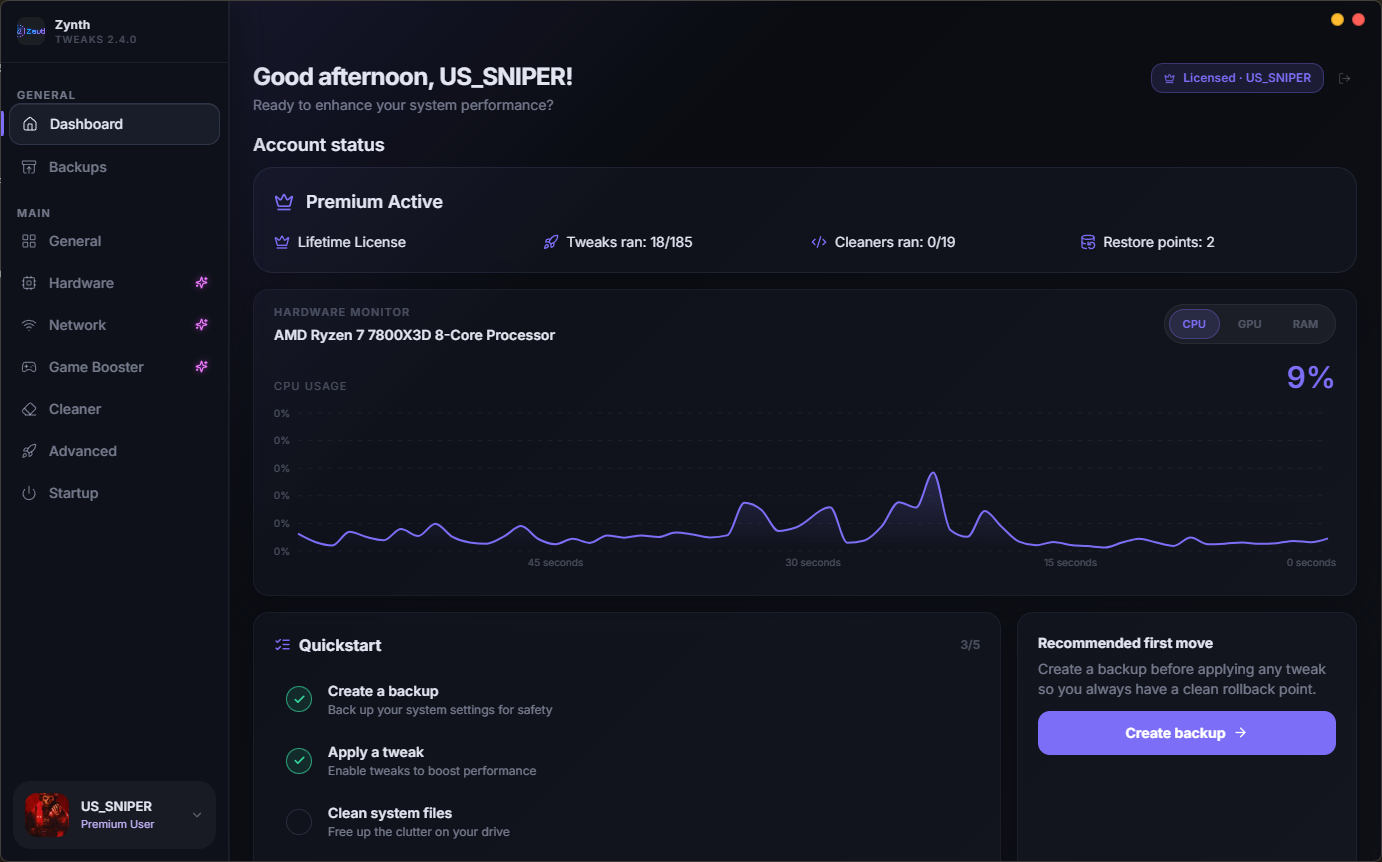
Zynth Tweaks v2.5.4 dashboard with account status and a 60-second CPU, GPU, RAM and SSD activity graph
0
Downloads
0
Game launchers supported
0
Tweaks & optimizations
0
One-click cleaners
What's inside

Everything you need to dominate performance

No bloat. No guesswork. Every tweak is explained, rated for impact, and reversible with one click.

Live hardware monitor

Real-time CPU, GPU and RAM graphs on the dashboard — see exactly what your tweaks are doing while you play.

CPU usage 14%

One-click tweaks

Flip a switch, get the gain. Each tweak shows impact level, safety rating, and whether a restart is needed.

Windows Game Mode
Medium impact
Fullscreen Optimizations
Medium impact
Windows Spotlight
Low impact
QoS Bandwidth Reserve
Medium impact
Game DVR Background
Medium impact

Game Booster

Detects games across Steam, Epic, EA, Xbox, Battle.net, Riot, Ubisoft and more — then applies a stronger FPS profile per session.

SteamEpicEAXboxBattle.netRiotUbisoft+3

Backups & restore

Create a restore point before any change. Roll back single tweaks or the whole profile — nothing is permanent unless you want it to be.

Restore point
Ready
Tweaks ran
22/176

Cleaner

19 targeted cleaners for cache, temp files, shader caches and update leftovers — safely, with a preview first.

Privacy hardening

Kill telemetry, background tracking and Bing lock-screen downloads with clean, reversible actions.

Network & latency

Release the QoS bandwidth reserve, tune DNS and TCP buffers, and cut input lag for competitive play.
AI Assistant

Ask your PC. Get a straight answer.

Built into Zynth Tweaks. It already sees your CPU, GPU, RAM, storage and Windows, and it only talks about your PC, your games, and the app.

  • Knows your parts

    Answers from the CPU, GPU, RAM, storage and Windows it can already see.

  • Two ways to ask

    Fast is 25 messages a day free, or 50 on Premium. Smart is 25 a day on Premium, and it can look at pictures.

  • Paste a screenshot

    On Smart, Ctrl+V drops in up to 3 pictures. You see a small preview, tap it to open it, and remove it if you change your mind.

  • Stays in the same chat

    Switch between Fast and Smart without starting over. It can search the web when a fact needs checking, and Analyze my PC names one top fix.

It explains and researches. It cannot change a setting, install anything, or turn off Windows security.

Try it in the app

Sample chat

Zynth Assistant Smart

Why does this game stutter after a few minutes?

Your GPU is the limit. Turn on Game Booster for that session, then cap the frame rate just under your monitor.

What is this error?

That is a driver timeout. Update the graphics driver, then launch the game again.

Ask anything about your PC…
25 a day free on Fast 50 a day on Fast with Premium 25 a day on Smart Pictures on Smart
How it works

Up and running in three steps

Install, back up, apply. That's the whole workflow.

1

Download & install

One installer for free and premium. Under two minutes, no separate downloads, auto-updates built in.

2

Create a backup

The dashboard quickstart walks you through a restore point first, so you always have a clean rollback.

3

Apply & play

Flip the tweaks you want, tune Game Mode, and let the monitor show you the difference in real time.

Game Booster Library

Every major launcher, scanned automatically — no manual setup

10launchers supported
  • Steam
  • Epic Games
  • EA
  • Xbox
  • Battle.net
  • GOG.com
  • Riot Games
  • Rockstar Games
  • Ubisoft
  • Microsoft Store

and more…

Community

What users are saying

Unedited feedback from members of the Zynth Tweaks Discord.

Join the DiscordRead more feedback and ask the community
P
Proxy
Discord

Honestly, the optimization is insane. Huge FPS boost, way more stable performance, and the game feels super smooth with no stutters at all. You can clearly tell the tweaks are well-made and professionally optimized. Serious service with real results. Highly recommended 100% 🔥

H
hared
Discord

tweaks are fire ty man

S
swervy
Discord

tweaks are good I get more constant fps

D
daniél
Discord

Tweaks are good, I got more FPS.

N
N1Kb2
Discord

vouch, tweaks work perfectly

Pricing

Simple, transparent pricing

Same installer for everyone. Premium unlocks the moment you sign in — no key to paste, no waiting.

Monthly
€5/ month

Full access with the lowest commitment.

  • Everything in Free, plus
  • 300+ Premium Tweaks
  • Custom GPU, CPU and RAM Tweaks
  • Mouse and Keyboard Tweaks
  • Network Tweaks
  • Game Booster
  • Cancel anytime
Get started
LifetimeOne-time
€30once

One payment. No renewals, ever.

  • Everything in Free, plus
  • 300+ Premium Tweaks
  • Custom GPU, CPU and RAM Tweaks
  • Mouse and Keyboard Tweaks
  • Network Tweaks
  • Game Booster
  • No recurring billing
Get started
Free tool

Is your PC holding you back?

Pick your parts or scan your device. Get a score out of 100, bottlenecks at 1080p / 1440p / 4K, and clear upgrade-or-keep advice for every component.

Open PC Rater Runs 100% in your browser
0
Build score
1080p92
1440p88
4K74
FAQ

Questions, answered

Yes. Every tweak is reversible, rated for impact and safety, and the app pushes you to create a restore point before your first change. High-risk tweaks are clearly flagged so you know what you're applying.

No. One installer covers free and premium. Sign in with the same account you used to purchase and premium features unlock instantly.

Windows 10 and Windows 11, 64-bit. Administrator access is required because tweaks modify system settings, services and the registry.

Yes. Your license is tied to your account, not a device. Install on multiple machines and sign in with the same account.

All paid plans come with a 30-day money-back guarantee. Email support or open a Discord ticket and we'll sort it out within 3 business days.

Ready to unlock your system?

Download Zynth Tweaks, create a backup, and feel the difference in your first session. No credit card needed.